
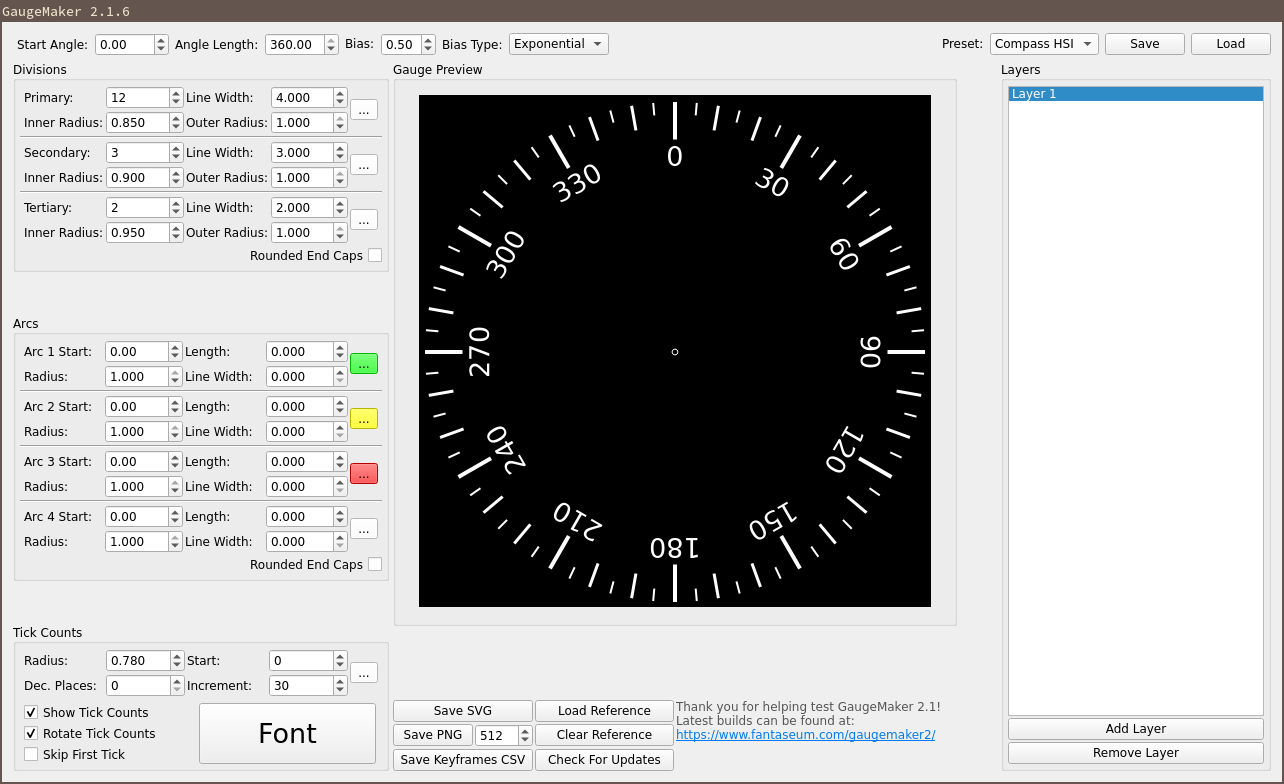
Back in 2010 I made a small .Net app to help me make gauges with tick marks for airplane development. I uploaded it to X-Plane.org and kinda forgot about it…I didn’t realize it actually had a little of a following.
The app was pretty limited but also very powerful in what it did do well. Biggest modern complaint was the limited resolution and the lack of vector support. I also heard a few “Where’s the Mac?” complaints!
Times have changed for me regarding my skillsets, so I decided to dust off GaugeMaker and redevelop it from the ground up in C++/Qt for cross platform capability!
I’ve done some updates and am pushing out version 2.1.6, which brings in some great new features.
FEATURES
- Non-Linear gauge options
- Layer support
- Automatically checks for updates
- Interface layout updated
- Reference Image support
- Export a list of primary tick angles to use for animation or programming reference
- Cross Platform (Windows, Mac, and Linux if requested)
- SVG Export
- Scalable PNG export (max 4096)
- Select from Preset gauges
- Optional rounded line caps
- Optional tick count rotation with gauge angle
- Save and Load .gauge files for later use and sharing
DOWNLOAD

Change List (2.2.0)
New:
- Save Layer…: Saving is now two buttons instead of one. Save writes your whole design with every layer in it. Save Layer… writes just the layer you are working on, as a one-layer file, and opens in the Presets folder – so building a preset is now a single click and your multi-layer designs no longer clutter the preset drop-down.
- Loading Adds Layers: Loading a .gauge file now adds its layers to what you already have instead of replacing it, so you can assemble a gauge from several saved pieces. If the layer you are on has unsaved changes, GaugeMaker asks whether to add the file as new layers, overwrite the current one, or cancel. Loading into a freshly opened GaugeMakerbehaves exactly as it always did.
- Rename Layers: Double-click a layer in the Layers panel – or select it and press F2 – to rename it. Names are saved in the .gauge file.
- New .gauge File Format: .gauge files now use a versioned format that is readable, and that no longer breaks when Qt is updated. Your existing .gauge files from 2.1.x still load normally.
Please note: files saved by 2.2.0 cannot be opened by 2.1.6 or older. Old files open in 2.2.0 fine – it is only the other direction that does not work. If you share .gauge files with someone, they will need 2.2.0 too.
Fixed:
- PNG Export Size: PNG export now works at every size. Previously only exact multiples of 512 came out correctly – any size below 512 saved a completely blank image, and larger sizes drew the gauge at the wrong scale in an otherwise-empty canvas. This was easy to hit, since the size box steps in 32s.
- PNG Export Transparency: The area behind the gauge is now properly transparent. It previously picked up whatever happened to be in memory, so exports could come out with garbage behind the artwork, differently each time.
- Fractional Arcs: Arc line widths, start angles and lengths now keep their decimals instead of being rounded to whole numbers. Arc widths below 1.0 used to collapse to a hairline.
- Tick Label Decimals: The Dec. Places setting now actually changes the drawn labels. It previously only affected what you could type into the boxes, so a tick set to 1.00 still drew as 1.
- Skip First Tick / Rotate Tick Counts: These two settings were swapped when a .gauge file was loaded, so a saved gauge could come back with the wrong one turned on.
Tick Font Colour: The tick font and its colour survive saving and loading again. A .gauge file written by one version of Qt could silently lose its font colour when opened by another. - Keyframe CSV: The CSV now contains every layer rather than only the last one drawn, with a Layer column naming each. Angles are also written at full precision – they were previously rounded off past 100 degrees, and any value of a million or more came out in scientific notation. Since this column positions a real needle, it is now exact.
- Centre Marker: The centre marker is drawn solid rather than hollow, so the exact centre pixel can be snapped to.
- Stability: Fixed crashes when removing layers and when starting from certain saved files.
Change List (2.1.6)
- Biased Non-linear Gauges
- Bias Type Selection
- Update Checker
- Save Keyframe Angles as CSV
- Layers Panel
- Reference Images
- Preset System rewritten
- Background set to black (transparent export)
Change List (2.0.4rc)
- Fixed bugs in loading presets
- Added Save and Load .gauge files
- Cleaned up some smaller interface bugs
Change List (2.0.3a)
- Added rounded end caps
- Added rotated tick counts
- Fixed bug causing last digit to not show
- Fixed spinbox step for outer radius of ticks